 Manually Installing Instrument Modules
If there is any difficulty installing instrument modules from within Midi Quest, it also possible to access and install them using a standard FTP application like Filezilla (which is free).
While the instructions are general in nature, this section was written for Mac users with M4 and M5 chips which crash Midi Quest when attempting to download instrument modules.
You should be able to use any FTP application to download the instrument modules. This example uses Filezilla as the sample application.
1. Download and install an FTP application. You can find Filezilla for both Windows and Macintosh at: https://filezilla-project.org/download.php?type=client
2. Run the FTP application and connect to the host. The information you will need to connect is:
Host: ftp.soundquest.org
Username: MidiQuest13@soundquest.org
Password: kqpkz-f#Kv5W

3. Press the "Connect" button and you should get a list of instrument modules available to download.
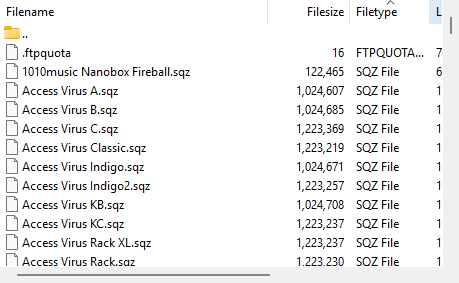
Scroll through the list of available instrument modules and drag and drop the .sqz files for the modules you want onto the computer's desktop.
4. Run Midi Quest.
5. Drag and drop the instrument module files (.sqz) on to Midi Quest's Studio window.
This procedure will install the instrument modules as if they had been downloaded and installed from within Midi Quest. Make sure that each instrument is configured with the correct MIDI Ports and channels and continue on.